Start with what the brand is buying
A message asking for “one reel” usually leaves several questions open. Does the brand want you to post it, deliver the video file, or do both? Can it run the video as an ad? How many revisions are included?
Write those details down before you fill in a rate card. Otherwise, the same total can mean very different amounts of work to you and the client.
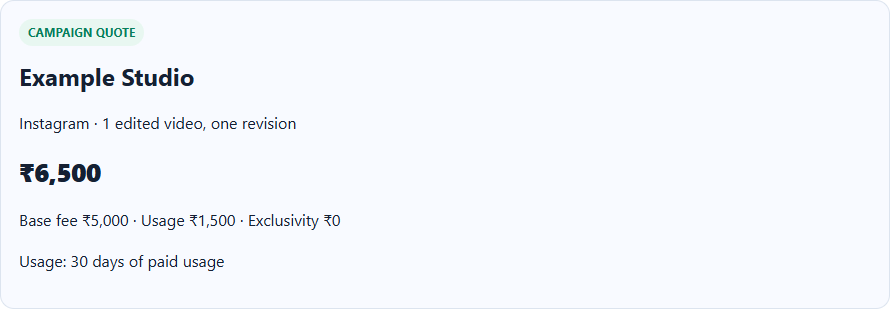
A simple quote example
Suppose you have already agreed a fee of ₹5,000 for creating one video, plus ₹1,500 for 30 days of paid usage. The arithmetic is:
| Line item | Entered amount |
|---|---|
| Video creation | ₹5,000 |
| Paid usage for 30 days | ₹1,500 |
| Exclusivity | ₹0 |
| Total quote | ₹6,500 |
These are example figures for explaining the tool. They are not a recommendation for what you should charge. The price should reflect the scope you agree, your costs and the value of the work.
Make the card in iSocialize
- Open Creator Deal Card and enter your creator or studio name.
- Select the platform. Describe the deliverable in plain terms, such as “one edited video, one revision, one Instagram post”.
- Enter the base fee. Add the separate paid-usage or exclusivity fees you have agreed.
- State the usage period and restrictions. “30 days of paid ads” is clearer than “usage included”.
- Add your payment and revision notes, then choose Create deal card.
- Check the total. Copy the text, or use Print / save PDF to prepare a copy to send.
Confirm these details alongside the card
- Deliverables: number of videos, images or story frames, their format and who posts them.
- Usage: where the brand may use the work and for how long.
- Exclusivity: which competing work is restricted and the period covered.
- Changes: included revisions and the process for extra work.
- Timing: draft date, approval date and posting window.
- Payment: advance, balance deadline, approved expenses and any applicable tax treatment.
The card is a quote summary. Record the full agreement separately if the job needs more detail than fits on the card.
What the total leaves out
The tool adds the base, usage and exclusivity fees you enter. Audience size is optional and does not calculate a price. Tax, travel, props, studio hire and platform fees are not added automatically.
If the brand asks for a second video or an extra month of usage, update the affected line instead of leaving the scope change hidden in a new total.
After the campaign
Keep the agreed card with the final deliverables. Use Creator Campaign Report Maker to prepare the results from your platform analytics. Keep the source analytics as well as the summary you send.